



第2章 尚品甄选-商品详情
2.1 商品详情
2.1.1 需求分析
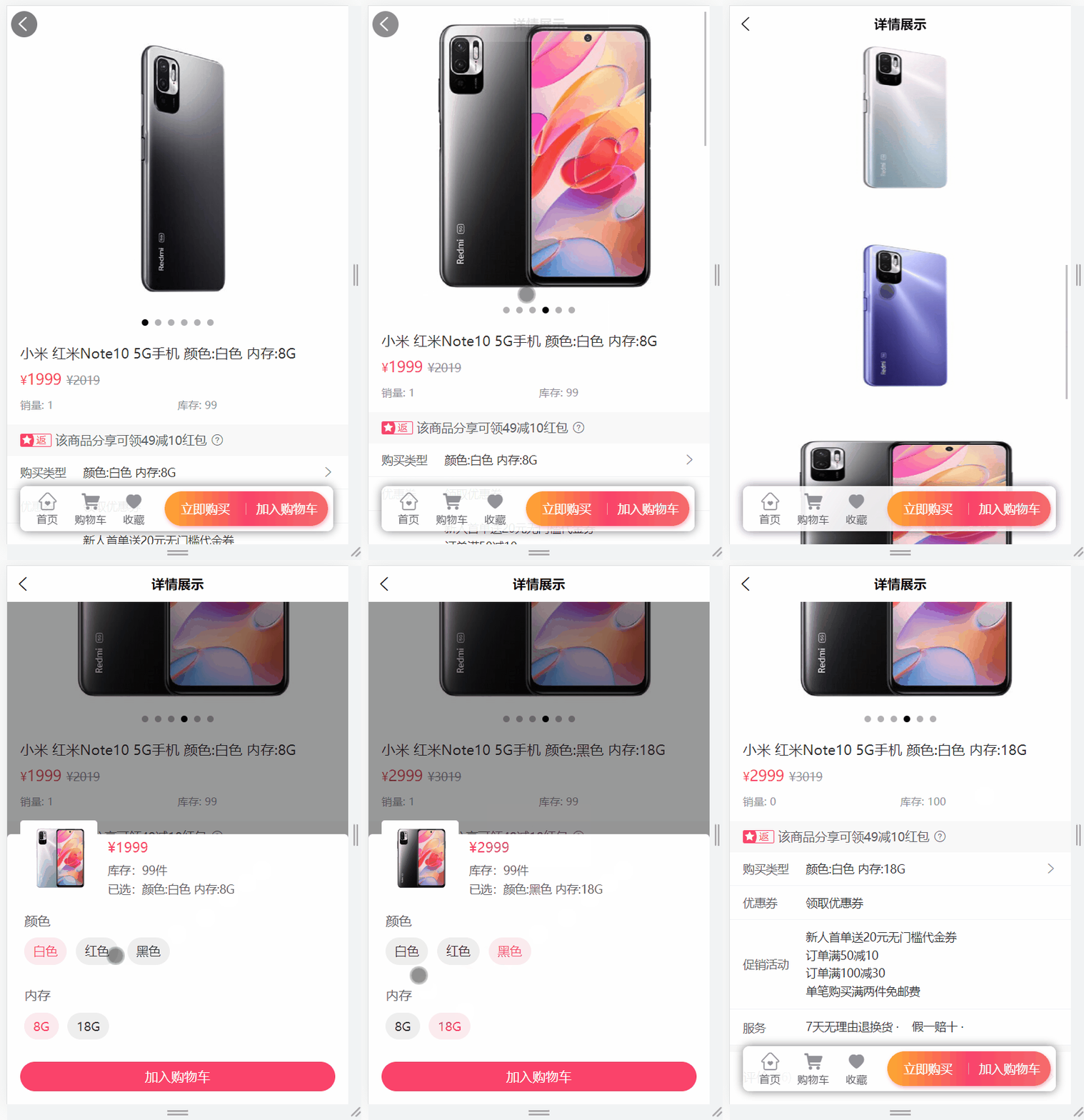
需求说明:当点击某一个商品的时候,此时就需要在商品详情页面展示出商品的详情数据,商品详情页所需数据:
1、商品的基本信息
2、当前商品sku的基本信息
3、商品sku最新价格信息
4、商品详情(详细为图片列表)
5、商品规格信息
6、商品库存信息
2.1.2 接口文档
商品详情数据接口以及示例数据:
get  /channel/item/{skuId}
返回结果:
{
    "msg": "操作成功",
    "code": 200,
    "data": {
        "productSku": {
            "id": 5,
            "skuCode": "1_4",
            "skuName": "小米 红米Note10 5G手机 黑色 + 8G",
            "productId": 1,
            "thumbImg": "http://139.198.127.41:9000/spzx/20230525/665832167-1_u_1.jpg",
            "salePrice": 1999.00,
            "marketPrice": 2019.00,
            "costPrice": 1599.00,
            "skuSpec": "黑色 + 8G",
            "weight": 1.00,
            "volume": 1.00,
            "status": 1,
            "stockNum": null,
            "saleNum": null
        },
        "product": {
            "id": 1,
            "name": "小米 红米Note10 5G手机",
            "brandId": 6,
            "category1Id": 1,
            "category2Id": 2,
            "category3Id": 3,
            "unitName": "个",
            "sliderUrls": "",
            "specValue": "",
            "status": 1,
            "auditStatus": 1,
            "auditMessage": "审批通过",
            "brandName": null,
            "category1Name": null,
            "category2Name": null,
            "category3Name": null,
            "productSkuList": null,
            "detailsimagesUrlList": null
        },
        "skuPrice": {
            "skuId": null,
            "salePrice": 1999.00,
            "marketPrice": 2019.00
        },
        "sliderUrlList": [
            "http://139.198.127.41:9000/spzx/20230525/665832167-5_u_1.jpg",
            ...
        ],
        "detailsimagesUrlList": [
            "http://139.198.127.41:9000/spzx/20230525/665832167-5_u_1.jpg",
            ...
        ],
        "specValueList": [
            {
                "valueList": [
                    "白色",
                    "红色",
                    "黑色"
                ],
                "key": "颜色"
            },
            {
                "valueList": [
                    "8G",
                    "18G"
                ],
                "key": "内存"
            }
        ],
        "skuStockVo": {
            "skuId": 5,
            "availableNum": 98,
            "saleNum": 2
        },
        "skuSpecValueMap": {
            "黑色 + 18G": 6,
            "红色 + 18G": 4,
            "白色 + 8G": 1,
            "白色 + 18G": 2,
            "黑色 + 8G": 5,
            "红色 + 8G": 3
        }
    }
}
2.1.3 获取商品相关信息
1、远程调用接口开发
(1)SkuPrice
操作模块:spzx-api-product
package com.spzx.product.api.domain;

@Data
public class SkuPrice {

    @Schema(description = "skuId")
    private Long skuId;

    @Schema(description = "售价")
    private BigDecimal salePrice;

    /**
     * 市场价
     */
    @Schema(description = "市场价")
    private BigDecimal marketPrice;
}
(2)SkuStockVo
操作模块:spzx-api-product
package com.spzx.product.api.domain;

@Data
public class SkuStockVo
{
    /** 商品ID */
    private Long skuId;

    /** 可用库存数 */
    private Integer availableNum;

    /** 销量 */
    private Integer saleNum;
}
(3)ProductController
操作模块:spzx-product
@Operation(summary = "获取商品sku信息")
@InnerAuth
@GetMapping(value = "/getProductSku/{skuId}")
public R<ProductSku> getProductSku(@PathVariable("skuId") Long skuId)
{
    return R.ok(productService.getProductSku(skuId));
}

@Operation(summary = "获取商品信息")
@InnerAuth
@GetMapping(value = "/getProduct/{id}")
public R<Product> getProduct(@PathVariable("id") Long id)
{
    return R.ok(productService.getProduct(id));
}

@Operation(summary = "获取商品sku最新价格信息")
@InnerAuth
@GetMapping(value = "/getSkuPrice/{skuId}")
public R<SkuPrice> getSkuPrice(@PathVariable("skuId") Long skuId)
{
    return R.ok(productService.getSkuPrice(skuId));
}

@Operation(summary = "获取商品详细信息")
@InnerAuth
@GetMapping(value = "/getProductDetails/{id}")
public R<ProductDetails> getProductDetails(@PathVariable("id") Long id)
{
    return R.ok(productService.getProductDetails(id));
}

@Operation(summary = "获取商品sku规则详细信息")
@InnerAuth
@GetMapping(value = "/getSkuSpecValue/{id}")
public R<Map<String, Long>> getSkuSpecValue(@PathVariable("id") Long id)
{
    return R.ok(productService.getSkuSpecValue(id));
}

@Operation(summary = "获取商品sku库存信息")
@InnerAuth
@GetMapping(value = "/getSkuStock/{skuId}")
public R<SkuStockVo> getSkuStock(@PathVariable("skuId") Long skuId)
{
    return R.ok(productService.getSkuStock(skuId));
}
(4)IProductService
ProductSku getProductSku(Long skuId);

Product getProduct(Long id);

SkuPrice getSkuPrice(Long skuId);

ProductDetails getProductDetails(Long id);

Map<String, Long> getSkuSpecValue(Long id);

SkuStockVo getSkuStock(Long skuId);
(5)ProductServiceImpl
@Override
public ProductSku getProductSku(Long skuId) {
    return productSkuMapper.selectById(skuId);
}

@Override
public Product getProduct(Long id) {
    return productMapper.selectById(id);
}

@Override
public SkuPrice getSkuPrice(Long skuId) {
    ProductSku productSku = productSkuMapper.selectOne(new LambdaQueryWrapper<ProductSku>().eq(ProductSku::getId, skuId).select(ProductSku::getSalePrice, ProductSku::getMarketPrice));
    SkuPrice skuPrice = new SkuPrice();
    BeanUtils.copyProperties(productSku, skuPrice);
    return skuPrice;
}

@Override
public ProductDetails getProductDetails(Long id) {
    return productDetailsMapper.selectOne(new LambdaQueryWrapper<ProductDetails>().eq(ProductDetails::getProductId, id));
}

@Override
public Map<String, Long> getSkuSpecValue(Long id) {
    List<ProductSku> productSkuList = productSkuMapper.selectList(new LambdaQueryWrapper<ProductSku>().eq(ProductSku::getProductId, id).select(ProductSku::getId, ProductSku::getSkuSpec));

    Map<String,Long> skuSpecValueMap = new HashMap<>();
    productSkuList.forEach(item -> {
        skuSpecValueMap.put(item.getSkuSpec(), item.getId());
    });
    return skuSpecValueMap;
}

@Override
public SkuStockVo getSkuStock(Long skuId) {
    SkuStock skuStock = skuStockMapper.selectOne(new LambdaQueryWrapper<SkuStock>().eq(SkuStock::getSkuId, skuId));
    SkuStockVo skuStockVo = new SkuStockVo();
    BeanUtils.copyProperties(skuStock, skuStockVo);
    return skuStockVo;
}
2、openFeign接口定义
操作模块:spzx-api-product
(1)RemoteProductService
@GetMapping("/product/getProductSku/{skuId}")
public R<ProductSku> getProductSku(@PathVariable("skuId") Long skuId, @RequestHeader(SecurityConstants.FROM_SOURCE) String source);

@GetMapping(value = "/product/getProduct/{id}")
public R<Product> getProduct(@PathVariable("id") Long id, @RequestHeader(SecurityConstants.FROM_SOURCE) String source);

@GetMapping(value = "/product/getSkuPrice/{skuId}")
public R<SkuPrice> getSkuPrice(@PathVariable("skuId") Long skuId, @RequestHeader(SecurityConstants.FROM_SOURCE) String source);

@GetMapping(value = "/product/getProductDetails/{id}")
public R<ProductDetails> getProductDetails(@PathVariable("id") Long id, @RequestHeader(SecurityConstants.FROM_SOURCE) String source);

@GetMapping(value = "/product/getSkuSpecValue/{id}")
public R<Map<String, Long>> getSkuSpecValue(@PathVariable("id") Long id, @RequestHeader(SecurityConstants.FROM_SOURCE) String source);

@GetMapping(value = "/product/getSkuStock/{skuId}")
public R<SkuStockVo> getSkuStock(@PathVariable("skuId") Long skuId, @RequestHeader(SecurityConstants.FROM_SOURCE) String source);
说明:将spzx-product模块Product、ProductDetails实体类移取到spzx-api-product模块
(2)RemoteProductFallbackFactory
@Override
public R<ProductSku> getProductSku(Long skuId, String source) {
    return R.fail("获取商品sku失败:" + throwable.getMessage());
}

@Override
public R<Product> getProduct(Long id, String source) {
    return R.fail("获取商品信息失败:" + throwable.getMessage());
}

@Override
public R<SkuPrice> getSkuPrice(Long skuId, String source) {
    return R.fail("获取商品sku价格失败:" + throwable.getMessage());
}

@Override
public R<ProductDetails> getProductDetails(Long id, String source) {
    return R.fail("获取商品详情失败:" + throwable.getMessage());
}

@Override
public R<Map<String, Long>> getSkuSpecValue(Long id, String source) {
    return R.fail("获取商品sku规格失败:" + throwable.getMessage());
}

@Override
public R<SkuStockVo> getSkuStock(Long skuId, String source) {
    return R.fail("获取商品sku库存失败:" + throwable.getMessage());
}
2.1.4 业务接口开发
1、ItemController
package com.spzx.channel.controller;

@Tag(name = "商品详情接口")
@RestController
@RequestMapping("/item")
public class ItemController extends BaseController {

    @Autowired
    private IItemService itemService;

    @Operation(summary = "商品详情")
    @GetMapping("/{skuId}")
    public AjaxResult item(@PathVariable Long skuId) {
        return success(itemService.item(skuId));
    }

}
2、ItemVo
package com.atguigu.channel.domain;

@Data
@Schema(description = "商品详情对象")
public class ItemVo {

   @Schema(description = "商品sku信息")
   private ProductSku productSku;

   @Schema(description = "商品信息")
   private Product product;

   @Schema(description = "最新价格信息")
   private SkuPrice skuPrice;

   @Schema(description = "商品轮播图列表")
   private List<String> sliderUrlList;

   @Schema(description = "商品详情图片列表")
   private List<String> detailsimagesUrlList;

   @Schema(description = "商品规格信息")
   private JSONArray specValueList;

   @Schema(description = "商品库存信息")
   private SkuStockVo skuStockVo;

   @Schema(description = "商品规格对应商品skuId信息")
   private Map<String,Long> skuSpecValueMap;

}
3、IItemService
package com.spzx.channel.service;

public interface IItemService {
    ItemVo item(Long skuId);
}
4、ItemServiceImpl
package com.spzx.channel.service.impl;

@Service
@Slf4j
public class ItemServiceImpl implements IItemService {

    @Autowired
    private RemoteProductService remoteProductService;

    @Override
    public ItemVo item(Long skuId) {
        ItemVo itemVo = new ItemVo();

        //获取sku信息
        R<ProductSku> productSkuResult = remoteProductService.getProductSku(skuId, SecurityConstants.INNER);
        if (R.FAIL == productSkuResult.getCode()) {
            throw new ServiceException(productSkuResult.getMsg());
        }
        ProductSku productSku = productSkuResult.getData();
        itemVo.setProductSku(productSku);

        //获取商品信息
        R<Product> productResult = remoteProductService.getProduct(productSku.getProductId(), SecurityConstants.INNER);
        if (R.FAIL == productResult.getCode()) {
            throw new ServiceException(productResult.getMsg());
        }
        Product product = productResult.getData();
        itemVo.setProduct(product);
        itemVo.setSliderUrlList(Arrays.asList(product.getSliderUrls().split(",")));
        itemVo.setSpecValueList(JSON.parseArray(product.getSpecValue()));

        //获取商品最新价格
        R<SkuPrice> skuPriceResult = remoteProductService.getSkuPrice(skuId, SecurityConstants.INNER);
        if (R.FAIL == skuPriceResult.getCode()) {
            throw new ServiceException(skuPriceResult.getMsg());
        }
        SkuPrice skuPrice = skuPriceResult.getData();
        itemVo.setSkuPrice(skuPrice);

        //获取商品详情
        R<ProductDetails> productDetailsResult = remoteProductService.getProductDetails(productSku.getProductId(), SecurityConstants.INNER);
        if (R.FAIL == productDetailsResult.getCode()) {
            throw new ServiceException(productDetailsResult.getMsg());
        }
        ProductDetails productDetails = productDetailsResult.getData();
        itemVo.setDetailsimagesUrlList(Arrays.asList(productDetails.getimagesUrls().split(",")));

        //获取商品规格对应商品skuId信息
        R<Map<String, Long>> skuSpecValueResult = remoteProductService.getSkuSpecValue(productSku.getProductId(), SecurityConstants.INNER);
        if (R.FAIL == skuSpecValueResult.getCode()) {
            throw new ServiceException(skuSpecValueResult.getMsg());
        }
        Map<String, Long> skuSpecValueMap = skuSpecValueResult.getData();
        itemVo.setSkuSpecValueMap(skuSpecValueMap);

        //获取商品库存信息
        R<SkuStockVo> skuStockResult = remoteProductService.getSkuStock(skuId, SecurityConstants.INNER);
        if (R.FAIL == skuStockResult.getCode()) {
            throw new ServiceException(skuStockResult.getMsg());
        }
        SkuStockVo skuStockVo = skuStockResult.getData();
        itemVo.setSkuStockVo(skuStockVo);

        return itemVo;
    }
}
5、接口测试
测试方向:
1、后端接口单独测试
2、配合前端项目测试
2.2 商品详情页面优化
2.2.1 思路
虽然咱们实现了页面需要的功能,但是考虑到该页面是被用户高频访问的,所以性能需要优化。一般一个系统最大的性能瓶颈,就是数据库的io操作。从数据库入手也是调优性价比最高的切入点。
一般分为两个层面:
- 一是提高数据库sql本身的性能
- 二是尽量避免直接查询数据库
重点要讲的是另外一个层面:尽量避免直接查询数据库。
解决办法就是:缓存
2.2.2 缓存常见问题
缓存最常见的4个问题: 面试
- 缓存穿透
- 缓存雪崩
- 缓存击穿
- 数据一致性
缓存穿透: 是指查询一个不存在的数据,由于缓存无法命中,将去查询数据库,但是数据库也无此记录,并且出于容错考虑,我们没有将这次查询的null写入缓存,这将导致这个不存在的数据每次请求都要到存储层去查询,失去了缓存的意义。在流量大时,可能DB就挂掉了,要是有人利用不存在的key频繁攻击我们的应用,这就是漏洞。
-
解决1 :空结果也进行缓存,但它的过期时间会很短,最长不超过五分钟,但是不能防止随机穿透。
-
解决2 :使用布隆过滤器或者Redis的Bitmap来解决随机穿透问题
缓存雪崩:是指在我们设置缓存时采用了相同的过期时间,导致缓存在某一时刻同时失效,请求全部转发到DB,DB瞬时压力过重雪崩。
-
解决1:原有的失效时间基础上增加一个随机值,比如1-5分钟随机,这样每一个缓存的过期时间的重复率就会降低,就很难引发集体失效的事件。
-
解决2:如果单节点宕机,可以采用集群部署方式防止雪崩
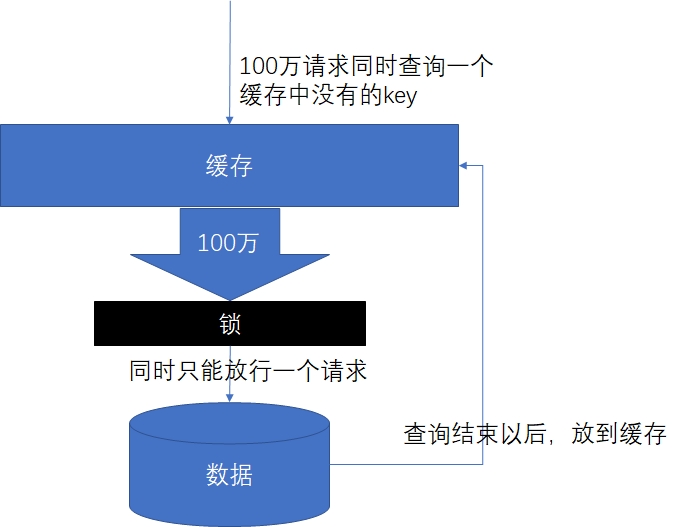
缓存击穿: 是指对于一些设置了过期时间的key,如果这些key可能会在某些时间点被超高并发地访问,是一种非常“热点”的数据。这个时候,需要考虑一个问题:如果这个key在大量请求同时进来之前正好失效,那么所有对这个key的数据查询都落到db,我们称为缓存击穿。
与缓存雪崩的区别:
- 击穿是一个热点key失效
- 雪崩是很多key集体失效
- 解决:锁
数据一致性:在当前环境下,通常我们会首选redis缓存来减轻我们数据库访问压力。但是也会遇到以下这种情况:大量用户来访问我们系统,首先会去查询缓存, 如果缓存中没有数据,则去查询数据库,然后更新数据到缓存中,并且如果数据库中的数据发生了改变则需要同步到redis中,同步过程中需要保证 MySQL与redis数据一致性问题
- 解决1:使用延时双删策略
延时双删策略是一种常见的保证MySQL和Redis数据一致性的方法。其主要流程包括:先删除缓存,然后更新数据库。这个过程完成后,大约在数据库从库更新后再次删除缓存。具体的步骤如下:
第一步,先执行redis.del(key)操作删除缓存;
第二步,然后执行写数据库的操作;
第三步,休眠一段时间(例如500毫秒),根据具体的业务时间来定;
第四步,再次执行redis.del(key)操作删除缓存。
延时双删策略通过这种方式尝试达到最终的数据一致性,但是这并不是强一致性,因为MySQL和Redis主从节点数据的同步并不是实时的,所以需要等待一段时间以增强它们的数据一致性。同时,由于读写是并发的,可能出现缓存和数据库数据不一致的问题
- 解决2:使用canal解决
2.3 数据一致性-延时双删策略
2.3.1 问题分析
在查询商品详情数据时,为避免频繁io,提高查询效率,在详情数据获取的同时,利用缓存机制,将详情数据存储到redis实现的缓存机制中,但带来效率提升的同时也带来了问题,就是如果在商品修改之后,因为业务数据更新等原因,对于mysql中商品原数据进行了修改,将导致redis中缓存数据和mysql中原始数据不一致的问题,这里可以使用延迟双删来保证缓存与数据库数据一致性!
2.3.2 代码实现
在ProductServiceImpl类的修改商品方法添加代码
//修改
@Transactional
@Override
public int updateProduct(Product product) {
    //1 删除缓存
    List<Long> skuIdList =  product.getProductSkuList().stream()
        .map(ProductSku::getId).collect(Collectors.toList());
    skuIdList.forEach(skuId -> {
        String dataKey = "product:sku:" + skuId;
        this.redisTemplate.delete(dataKey);
    });

    //2 之前的业务代码,执行更新商品操作.....


    //3 休眠一段时间
    try {
        Thread.sleep(100);
    } catch (InterruptedException e) {
        throw new RuntimeException(e);
    }

    //4 再次执行操作删除缓存
    skuIdList.forEach(skuId -> {
        String dataKey = "product:sku:" + skuId;
        this.redisTemplate.delete(dataKey);
    });
    return 1;
}
2.4 分布式锁
2.4.1 本地锁的局限性
之前,我们学习过synchronized 及lock锁,这些锁都是本地锁。接下来写一个案例,演示本地锁的问题
1、编写测试代码
在spzx-product中新建TestController中添加测试方法
package com.spzx.product.controller;

@Tag(name = "测试接口")
@RestController
@RequestMapping("/test")
public class TestController {

    @Autowired
    private TestService testService;

    @GetMapping("testLock")
    public AjaxResult testLock() {
        testService.testLock();
        return AjaxResult.success();
    }
}
业务接口
package com.spzx.product.service;

public interface TestService {
   void testLock();
}
业务实现类
package com.spzx.product.service.impl;
@Service
public class TestServiceImpl implements TestService {

   @Autowired
   private StringRedisTemplate stringRedisTemplate;

   @Override
   public void testLock() {
      // 查询Redis中的num值
      String value = (String)this.stringRedisTemplate.opsForValue().get("num");
      // 没有该值return
      if (StringUtils.isBlank(value)){
         return ;
      }
      // 有值就转成成int
      int num = Integer.parseInt(value);
      // 把Redis中的num值+1
      this.stringRedisTemplate.opsForValue().set("num", String.valueOf(++num));
   }
}
说明:通过reids客户端设置num=0
重启spzx-product服务
2、使用工具测试
第一步:安装jmeter工具
第二步:配置网关并重启网关
配置本地锁测试接口为白名单
  # 不校验白名单
  ignore:
    whites:
     ...省略
      - /product/test/**
重启网关
第三步:测试
注意:将Windows防火墙关闭!!!!!!!!!!
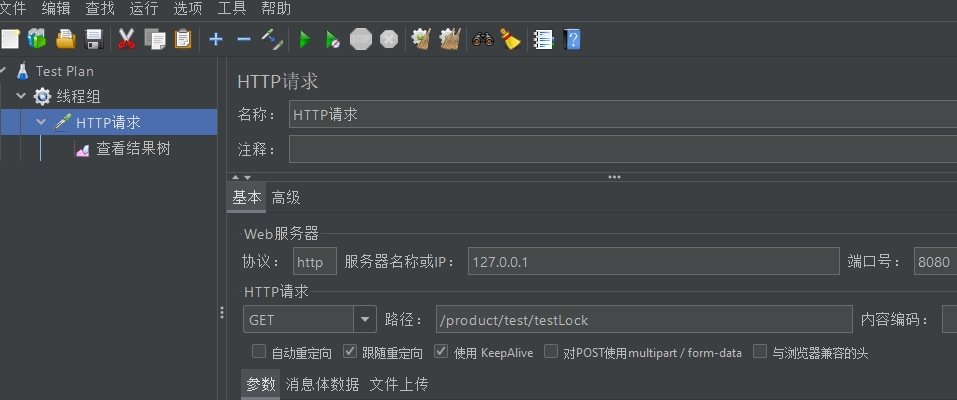
- 使用jmeter工具压力测试:并发100
查看Redis中的结果:
3、使用本地锁
@Override
public synchronized void testLock() {
   // 查询Redis中的num值
   String value = (String)this.stringRedisTemplate.opsForValue().get("num");
   // 没有该值return
   if (StringUtils.isBlank(value)){
      return ;
   }
   // 有值就转成成int
   int num = Integer.parseInt(value);
   // 把Redis中的num值+1
   this.stringRedisTemplate.opsForValue().set("num", String.valueOf(++num));
}
- 使用jmeter工具压力测试:并发100
4、本地锁问题演示
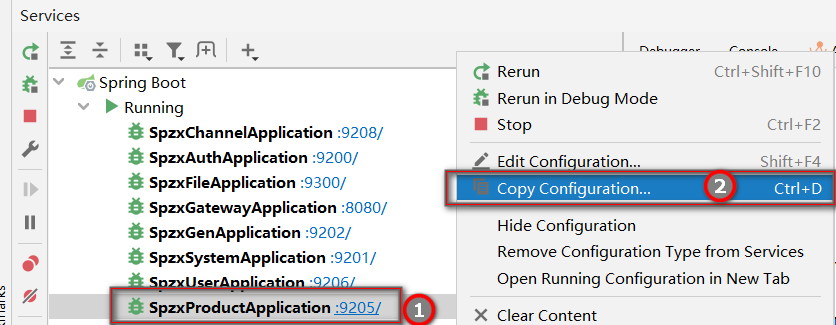
接下来spzx-product启动9205 9215 9225三个运行实例:
第一步:拷贝配置
第二步:修改端口
选择vm options
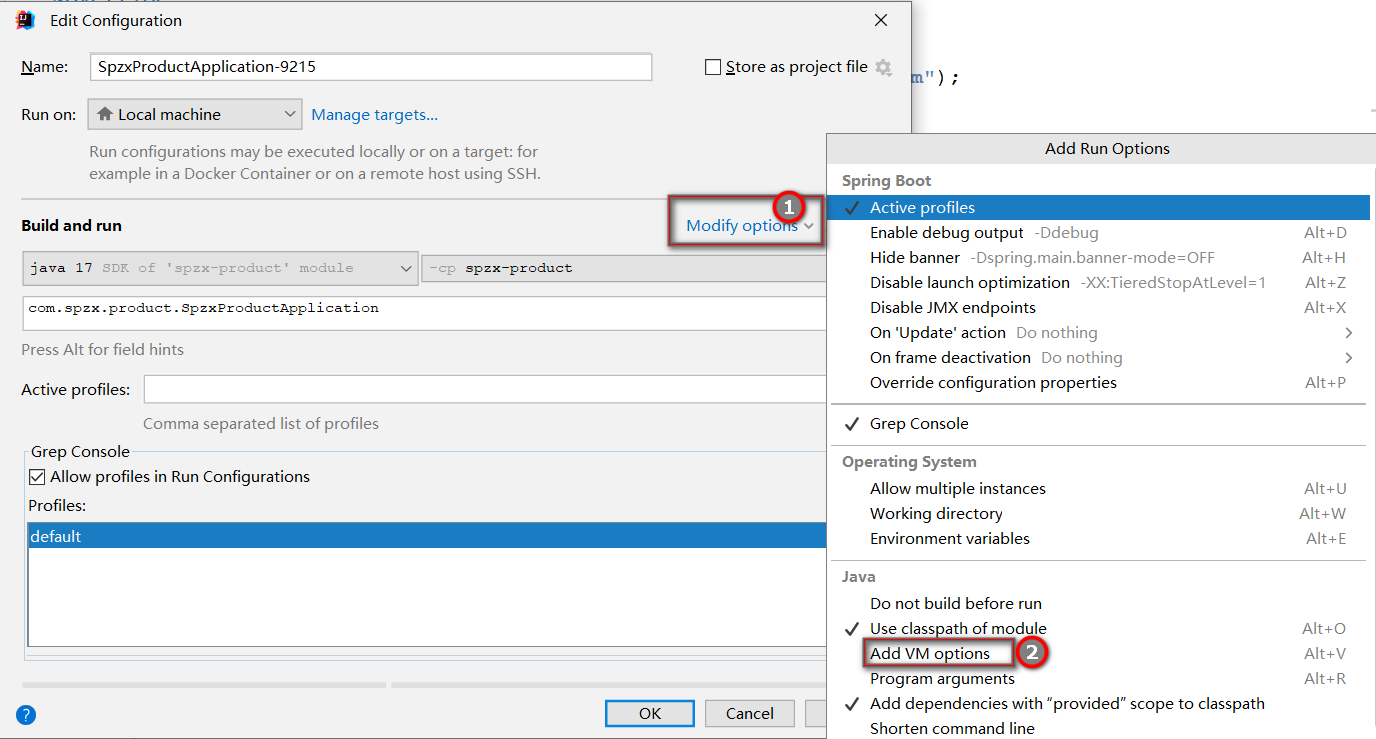
添加命令行参数:
-Dserver.port=9215
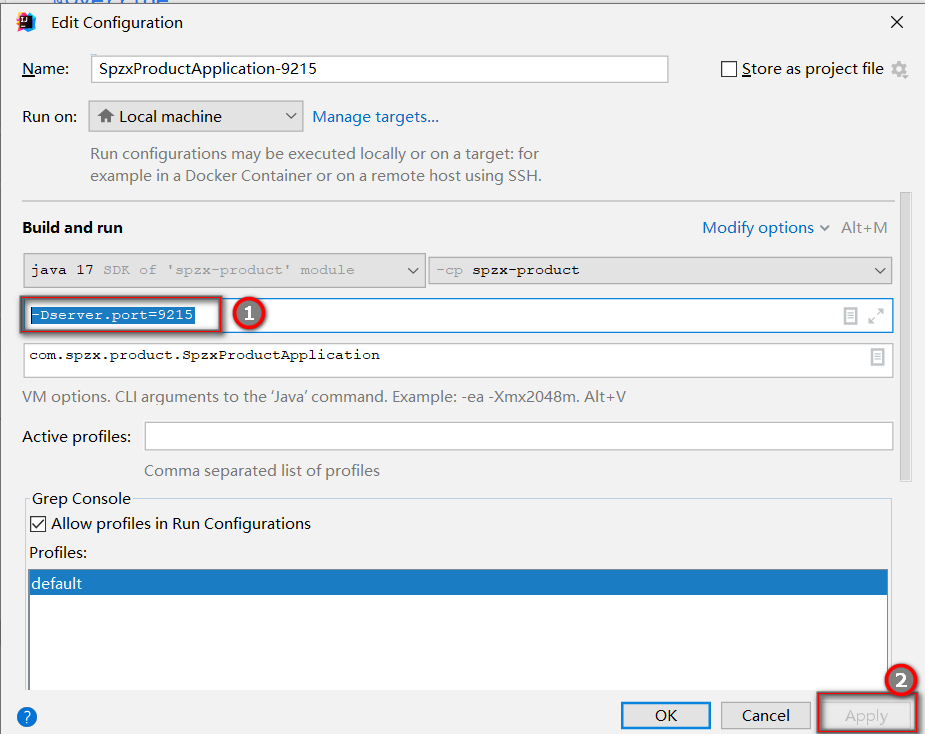
同样的,再复制并配置一个实例,端口为9525
第三步:启动spzx-product的三个实例
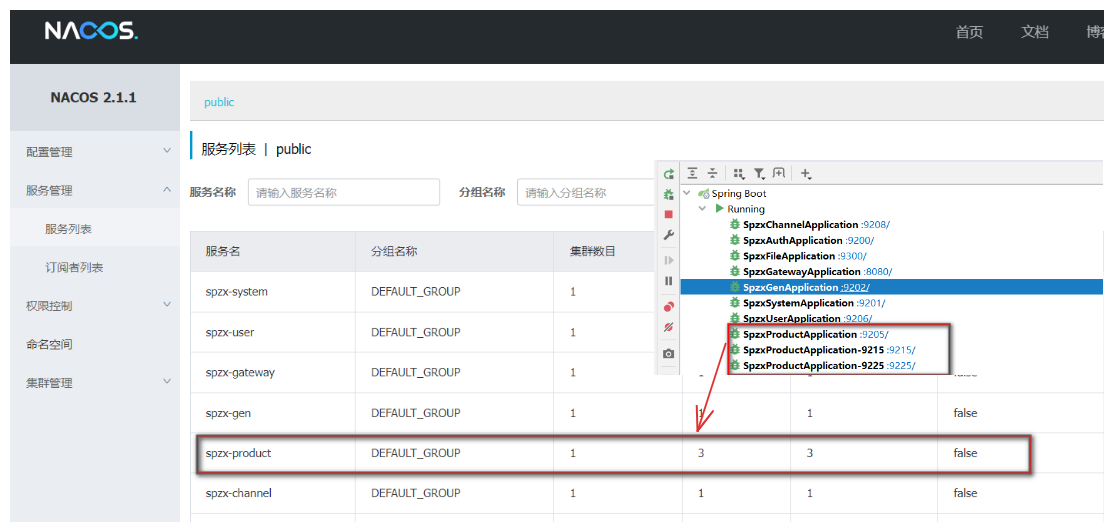
第四步:通过网关压力测试本地锁
以上测试,可以发现:
本地锁只能锁住同一工程内的资源,在分布式系统里面都存在局限性。
此时需要分布式锁。
2.4.2 分布式锁实现的解决方案
随着业务发展的需要,原单体单机部署的系统被演化成分布式集群系统后,由于分布式系统多线程、多进程并且分布在不同机器上,这将使原单机部署情况下的并发控制锁策略失效,单纯的Java API并不能提供分布式锁的能力。为了解决这个问题就需要一种跨JVM的互斥机制来控制共享资源的访问,这就是分布式锁要解决的问题!
分布式锁主流的实现方案:
- 基于数据库实现分布式锁
- 基于缓存( Redis等)
- 基于Zookeeper
每一种分布式锁解决方案都有各自的优缺点:
- 高性能:Redis最高
- 可靠性:zookeeper最高
因为Redis具备高性能、高可用、高并发的特性,这里,我们就基于Redis实现分布式锁。
分布式锁的关键是多进程共享的内存标记(锁),因此只要我们在Redis中放置一个这样的标记(数据)就可以了。不过在实现过程中,不要忘了我们需要实现下列目标:
- 多进程可见:多进程可见,否则就无法实现分布式效果
- 避免死锁:死锁的情况有很多,我们要思考各种异常导致死锁的情况,保证锁可以被释放
- 排它:同一时刻,只能有一个进程获得锁
- 高可用:避免锁服务宕机或处理好宕机的补救措施(redis集群架构:1.主从复制 2.哨兵 3.cluster集群)
分布式锁使用的逻辑如下:
尝试获取锁
	成功:执行业务代码
		执行业务
			try{
				获取锁
				业务代码-宕机
			} catch(){

			}finally{
				释放锁
			}
 	失败:等待;
2.4.3 使用Redis实现分布式锁
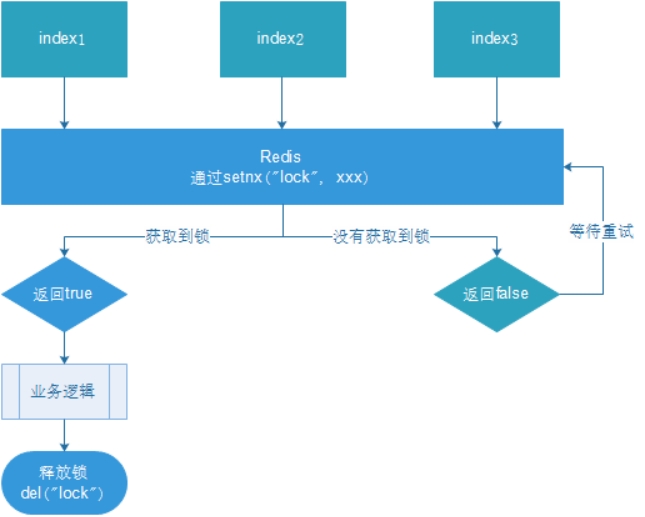
- 多个客户端同时获取锁(setnx)
- 获取成功,执行业务逻辑:从db获取数据,放入缓存,执行完成释放锁(del)
- 其他客户端等待重试
1、分布式锁初版
/**
 * 采用SpringDataRedis实现分布式锁
 * 原理:执行业务方法前先尝试获取锁(setnx存入key val),如果获取锁成功再执行业务代码,业务执行完毕后将锁释放(del key)
 */
@Override
public void testLock() {

    //0.先尝试获取锁 setnx key val
    Boolean flag = stringRedisTemplate.opsForValue().setIfAbsent("lock", "lock");
    if(flag){
        //获取锁成功,执行业务代码
        //1.先从redis中通过key num获取值  key提前手动设置 num 初始值:0
        String value = stringRedisTemplate.opsForValue().get("num");
        //2.如果值为空则非法直接返回即可
        if (StringUtils.isBlank(value)) {
            return;
        }
        //3.对num值进行自增加一
        int num = Integer.parseInt(value);
        stringRedisTemplate.opsForValue().set("num", String.valueOf(++num));

        //4.将锁释放
        stringRedisTemplate.delete("lock");

    }else{
        try {
            Thread.sleep(100);
            this.testLock();
        } catch (InterruptedException e) {
            e.printStackTrace();
        }
    }
}
重启,服务集群,通过网关压力测试:
基本实现。
**问题:**setnx刚好获取到锁,业务逻辑出现异常,导致锁无法释放
解决:设置过期时间,自动释放锁。
2、优化之设置锁的过期时间
设置过期时间有两种方式:
- 首先想到通过expire设置过期时间(缺乏原子性:如果在setnx和expire之间出现异常,锁也无法释放)
- 在set时指定过期时间(推荐)
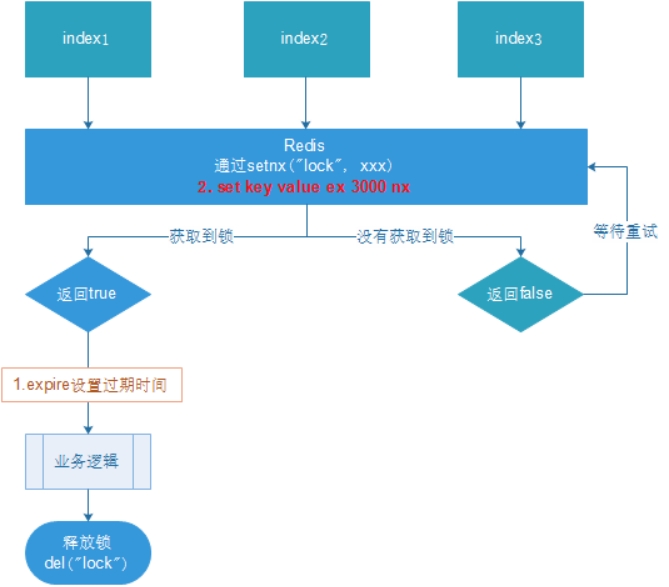
设置过期时间:
//0.先尝试获取锁 setnx key val
Boolean flag = redisTemplate.opsForValue().setIfAbsent("lock", "lock", 3, TimeUnit.SECONDS);
压力测试肯定也没有问题。自行测试
问题:可能会释放其他服务器的锁。
场景:如果业务逻辑的执行时间是7s。执行流程如下
-
index1业务逻辑没执行完,3秒后锁被自动释放。
-
index2获取到锁,执行业务逻辑,3秒后锁被自动释放。
-
index3获取到锁,执行业务逻辑
. index1业务逻辑执行完成,开始调用del释放锁,这时释放的是index3的锁, 导致index3的业务只执行1s就被别人释放。
最终等于没锁的情况。
解决:setnx获取锁时,设置一个指定的唯一值(例如:uuid);释放前获取这个值,判断是否自己的锁
3、优化之UUID防误删
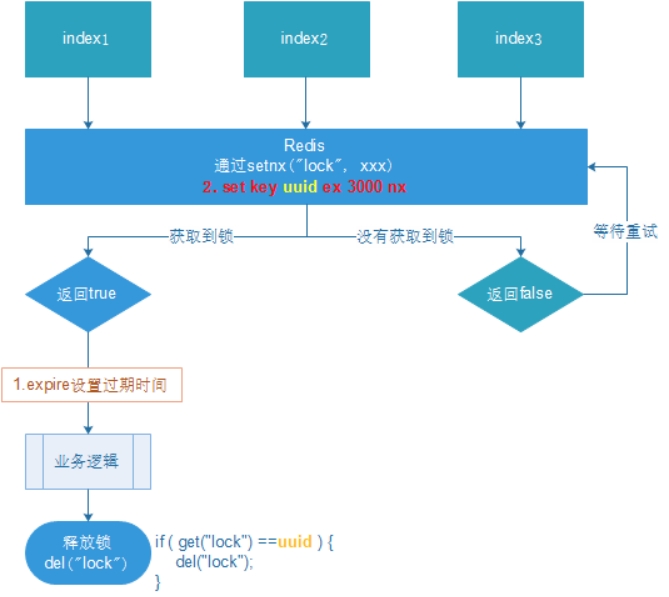
@Override
public void testLock() {
    //0.先尝试获取锁 setnx key val
    String uuid = UUID.randomUUID().toString();
    Boolean flag = stringRedisTemplate.opsForValue().setIfAbsent("lock", uuid, 3, TimeUnit.SECONDS);
    if(flag){
        //获取锁成功,执行业务代码
        //1.先从redis中通过key num获取值  key提前手动设置 num 初始值:0
        String value = stringRedisTemplate.opsForValue().get("num");
        //2.如果值为空则非法直接返回即可
        if (StringUtils.isBlank(value)) {
            return;
        }
        //3.对num值进行自增加一
        int num = Integer.parseInt(value);
        stringRedisTemplate.opsForValue().set("num", String.valueOf(++num));

        //4.将锁释放
        if(uuid.equals((String)stringRedisTemplate.opsForValue().get("lock"))) {
            stringRedisTemplate.delete("lock");
        }
    }else{
        try {
            Thread.sleep(100);
            this.testLock();
        } catch (InterruptedException e) {
            e.printStackTrace();
        }
    }
}
**问题:**删除操作缺乏原子性。
场景:
1、index1执行删除时,查询到的lock值确实和uuid相等

2、index1执行删除前,lock刚好过期时间已到,被Redis自动释放,在Redis中没有了锁。

3、index2获取了lock,index2线程获取到了cpu的资源,开始执行方法
4、index1执行删除,此时会把index2的lock删除。
index1 因为已经在方法中了,所以不需要重新上锁。index1有执行的权限。index1已经比较完成了,这个时候,开始执行

删除了index2的锁!
4、优化之LUA脚本保证删除的原子性
释放锁的LUA脚本:
if redis.call('get', KEYS[1]) == ARGV[1] then return redis.call('del', KEYS[1]) else return 0 end
redis java客户端使用LUA脚本:
//通过execute可以执行LUA脚本,参数1:脚本字符串,参数2:脚本返回值类型,参数3:keys列表,参数4:argv列表
stringRedisTemplate.execute(new DefaultRedisScript<>(script , Boolean.class),list,args...)
使用LUA脚本优化分布式锁
/**
 * 采用SpringDataRedis实现分布式锁
 * 原理:执行业务方法前先尝试获取锁(setnx存入key val),如果获取锁成功再执行业务代码,业务执行完毕后将锁释放(del key)
 */
@Override
public void testLock() {

    //0.先尝试获取锁 setnx key val
    //问题:锁可能存在线程间相互释放
    //Boolean flag = stringRedisTemplate.opsForValue().setIfAbsent("lock", "lock", 10, TimeUnit.SECONDS);
    //解决:锁值设置为uuid
    String uuid = UUID.randomUUID().toString();
    Boolean flag = stringRedisTemplate.opsForValue().setIfAbsent("lock", uuid, 10, TimeUnit.SECONDS);

    if(flag){
        //获取锁成功,执行业务代码
        //1.先从redis中通过key num获取值  key提前手动设置 num 初始值:0
        String value = stringRedisTemplate.opsForValue().get("num");
        //2.如果值为空则非法直接返回即可
        if (StringUtils.isBlank(value)) {
            return;
        }
        //3.对num值进行自增加一
        int num = Integer.parseInt(value);
        stringRedisTemplate.opsForValue().set("num", String.valueOf(++num));

        //4.将锁释放 判断uuid
        //问题:删除操作缺乏原子性。
        //if(uuid.equals(stringRedisTemplate.opsForValue().get("lock"))){ //线程一:判断是满足是当前线程锁的值
        //    //条件满足,此时锁正好到期,redis锁自动释放了线程2获取锁成功,线程1将线程2的锁删除
        //    stringRedisTemplate.delete("lock");
        //}
        //解决:redis执行lua脚本保证原子,lua脚本执行会作为一个整体执行

        //执行脚本参数 参数1:脚本对象封装lua脚本,参数二:lua脚本中需要key参数(KEYS[i])  参数三:lua脚本中需要参数值 ARGV[i]
        //4.1 先创建脚本对象 DefaultRedisScript泛型脚本语言返回值类型 Long 0:失败 1:成功
        DefaultRedisScript<Long> redisScript = new DefaultRedisScript<>();
        //4.2设置脚本文本
        String script = "if redis.call(\"get\",KEYS[1]) == ARGV[1]\n" +
                "then\n" +
                "    return redis.call(\"del\",KEYS[1])\n" +
                "else\n" +
                "    return 0\n" +
                "end";
        redisScript.setScriptText(script);
        //4.3 设置响应类型
        redisScript.setResultType(Long.class);
        stringRedisTemplate.execute(redisScript, Arrays.asList("lock"), uuid);
    }else{
        try {
            //睡眠
            Thread.sleep(100);
            //自旋重试
            this.testLock();
        } catch (InterruptedException e) {
            e.printStackTrace();
        }
    }
}
2.4.4 分布式锁总结
为了确保分布式锁可用,我们至少要确保锁的实现同时满足以下几个条件:
-
互斥性。在任意时刻,只有一个客户端能持有锁。
-
不会发生死锁。即使有一个客户端在持有锁的期间崩溃而没有主动解锁,也能保证后续其他客户端能加锁。
-
解铃还须系铃人。加锁和解锁必须是同一个客户端,客户端自己不能把别人加的锁给解了。
-
加锁和解锁必须具有原子性。
2.4.5 改造获取商品详情信息
操作模块:spzx-product
操作类:com.spzx.product.service.impl.ProductServiceImpl#getProductSku
@Autowired
private RedisTemplate redisTemplate;

/*
 * 根据SkuID查询SKU商品信息
 * @param skuId
 * @return
 */
@Override
public ProductSku getProductSku(Long skuId) {
    try {
        //1.优先从缓存中获取数据
        //1.1 构建业务数据Key 形式:前缀+业务唯一标识
        String dataKey = "product:sku:" + skuId;
        //1.2 查询Redis获取业务数据
        ProductSku productSku = (ProductSku) redisTemplate.opsForValue().get(dataKey);
        //1.3 命中缓存则直接返回
        if (redisTemplate.hasKey(dataKey)) {
            log.info("命中缓存,直接返回,线程ID:{},线程名称:{}", Thread.currentThread().getId(), Thread.currentThread().getName());
            return productSku;
        }
        //2.尝试获取分布式锁(set k v ex nx可能获取锁失败)
        //2.1 构建锁key
        String lockKey = "product:sku:lock:" + skuId;
        //2.2 采用UUID作为线程标识
        String lockVal = UUID.randomUUID().toString().replaceAll("-", "");
        //2.3 利用Redis提供set nx ex 获取分布式锁
        Boolean flag = redisTemplate.opsForValue().setIfAbsent(lockKey, lockVal, 5, TimeUnit.SECONDS);
        if (flag) {
            //3.获取锁成功执行业务,将查询业务数据放入缓存Redis
            log.info("获取锁成功:{},线程名称:{}", Thread.currentThread().getId(), Thread.currentThread().getName());
            try {
                productSku = this.getProductSkuFromDB(skuId);
                long ttl = productSku == null ? 1 * 60 : 10 * 60;
                redisTemplate.opsForValue().set(dataKey, productSku, ttl, TimeUnit.SECONDS);
                return productSku;
            } finally {
                //4.业务执行完毕释放锁
                String scriptText = "if redis.call(\"get\",KEYS[1]) == ARGV[1]\n" +
                    "then\n" +
                    "    return redis.call(\"del\",KEYS[1])\n" +
                    "else\n" +
                    "    return 0\n" +
                    "end";
                DefaultRedisScript<Long> redisScript = new DefaultRedisScript<>();
                redisScript.setScriptText(scriptText);
                redisScript.setResultType(Long.class);
                redisTemplate.execute(redisScript, Arrays.asList(lockKey), lockVal);
            }
        } else {
            try {
                //5.获取锁失败则自旋(业务要求必须执行)
                Thread.sleep(200);
            } catch (InterruptedException e) {
                throw new RuntimeException(e);
            }
            log.error("获取锁失败,自旋:{},线程名称:{}", Thread.currentThread().getId(), Thread.currentThread().getName());
            return this.getProductSku(skuId);
        }
    } catch (Exception e) {
        //兜底处理方案:Redis服务有问题,将业务数据获取自动从数据库获取
        log.error("[商品服务]查询商品信息异常:{}", e);
        return this.getProductSkuFromDB(skuId);
    }
}

public ProductSku getProductSkuFromDB(Long skuId) {
    return productSkuMapper.selectById(skuId);
}
2.5 Redis的Bitmap解决缓存穿透
2.5.1 概述
Redis 的 Bitmap(位图)是一种特殊的字符串数据类型,它利用字符串类型键(key)来存储一系列连续的二进制位(bits),每个位可以独立地表示一个布尔值(0 或 1)。这种数据结构非常适合用于存储和操作大量二值状态的数据,尤其在需要高效空间利用率和特定位操作场景中表现出色。
2.5.2 常见操作命令
setbit key offset value:设置或清除指定偏移量上的位(bit)。offset是从0开始的位索引,value可以为 0 或 1。getbit key offset:返回指定偏移量上的位值。
2.5.3 整合
1、初始化数据
在spzx-product 模块的启动类中添加
@EnableCustomConfig
@EnableRyFeignClients
@SpringBootApplication
public class SpzxProductApplication implements CommandLineRunner{

    public static void main(String[] args) {
        SpringApplication.run(SpzxProductApplication.class,args);
    }

    @Autowired
    private RedisTemplate redisTemplate;

    @Autowired
    private ProductSkuMapper productSkuMapper;

    //商品功能
    @Override
    public void run(String... args) throws Exception {
        String key = "sku:product:data";
        //查询mysql里面商品skuId
        List<ProductSku> productSkuList = productSkuMapper.selectList(null);
        productSkuList.forEach(item -> {
            //为了测试,添加到redis里面
            redisTemplate.opsForValue().setBit(key,item.getId(),true);
        });
    }
}
2、sku加入Bitmap
商品上架时将数据添加到Bitmap中
操作:ProductServiceImpl.updateStatus方法
@Transactional(rollbackFor = Exception.class)
@Override
public void updateStatus(Long id, Integer status) {
    Product product = new Product();
    product.setId(id);
    if(status == 1) {
        product.setStatus(1);

        String key = "sku:product:data";
        List<ProductSku> productSkuList = productSkuMapper
                .selectList(new LambdaQueryWrapper<ProductSku>()
                        .eq(ProductSku::getProductId, id));
        productSkuList.forEach(item -> {
            redisTemplate.opsForValue().setBit(key,item.getId(),true);
        });
    } else {
        product.setStatus(-1);
    }
    productMapper.updateById(product);
}
3、sku详情页添加Bitmap
操作模块:spzx-channel
@Override
public ItemVo item(Long skuId) {
    //远程调用商品微服务接口之前 提前知道用户访问商品SKUID是否存在于bitmap中
        String key = "sku:product:data";
        Boolean flag = redisTemplate.opsForValue().getBit(key, skuId);
        if (!flag) {
            log.error("用户查询商品sku不存在:{}", skuId);
            //查询数据不存在直接返回空对象
            throw new ServiceException("用户查询商品sku不存在");
        }
 	...
}
2.6 异步编排
2.6.1 .问题分析
问题:查询商品详情页的逻辑非常复杂,数据的获取都需要远程调用,必然需要花费更多的时间。
假如商品详情页的每个查询,需要如下标注的时间才能完成
- 获取sku的基本信息 1s
. 获取商品信息 1.5s
. 商品最新价格 0.5s
那么,用户需要3s后才能看到商品详情页的内容。很显然是不能接受的。如果有多个线程同时完成这4步操作,也许只需要1.5s即可完成响应。
CompletableFuture可以使原本串行执行的代码,变为并行执行,提高代码执行速度。
2.6.2 优化商品详情页
1、ThreadPoolConfig
全局自定义线程池配置
package com.spzx.channel.configure;

import org.springframework.context.annotation.Bean;
import org.springframework.context.annotation.Configuration;

import java.util.concurrent.ArrayBlockingQueue;
import java.util.concurrent.Executors;
import java.util.concurrent.ThreadPoolExecutor;
import java.util.concurrent.TimeUnit;


@Configuration
public class ThreadPoolConfig {

    @Bean
    public ThreadPoolExecutor threadPoolExecutor() {
        //当前系统可用的处理器数量
        int processorsCount = Runtime.getRuntime().availableProcessors();
        ThreadPoolExecutor threadPoolExecutor = new ThreadPoolExecutor(
                processorsCount * 2,
                processorsCount * 2,
                0,
                TimeUnit.SECONDS,
                new ArrayBlockingQueue<>(200),
                Executors.defaultThreadFactory(),
                //new ThreadPoolExecutor.CallerRunsPolicy()
                //自定义拒绝策略
                (runnable, executor) -> {
                    try {
                        Thread.sleep(200);
                    } catch (InterruptedException e) {
                    }
                    //再次将拒绝任务提交给线程池执行
                    executor.submit(runnable);
                }
        );
        //线程池创建,核心线程同时创建
        //threadPoolExecutor.prestartCoreThread();
        threadPoolExecutor.prestartAllCoreThreads();
        return threadPoolExecutor;
    }
}
2、ItemServiceImpl
@Autowired
private ThreadPoolExecutor threadPoolExecutor;

@Override
public ItemVo item(Long skuId) {
        String key = "sku:product:data";
        Boolean flag = redisTemplate.opsForValue().getBit(key, skuId);
        if (!flag) {
            log.error("用户查询商品sku不存在:{}", skuId);
            //查询数据不存在直接返回空对象
            throw new ServiceException("用户查询商品sku不存在");
        }

    ItemVo itemVo = new ItemVo();
    //获取sku信息
    CompletableFuture<ProductSku> skuCompletableFuture = CompletableFuture.supplyAsync(() -> {
        R<ProductSku> productSkuResult = remoteProductService.getProductSku(skuId, SecurityConstants.INNER);
        if (R.FAIL == productSkuResult.getCode()) {
            throw new ServiceException(productSkuResult.getMsg());
        }
        ProductSku productSku = productSkuResult.getData();
        itemVo.setProductSku(productSku);
        return productSku;
    }, threadPoolExecutor);

    //获取商品信息
    CompletableFuture<Void> productComCompletableFuture = skuCompletableFuture.thenAcceptAsync(productSku -> {
        R<Product> productResult = remoteProductService.getProduct(productSku.getProductId(), SecurityConstants.INNER);
        if (R.FAIL == productResult.getCode()) {
            throw new ServiceException(productResult.getMsg());
        }
        Product product = productResult.getData();
        itemVo.setProduct(product);
        itemVo.setSliderUrlList(Arrays.asList(product.getSliderUrls().split(",")));
        itemVo.setSpecValueList(JSON.parseArray(product.getSpecValue()));
    }, threadPoolExecutor);

    //获取商品最新价格
    CompletableFuture<Void> skuPriceCompletableFuture = CompletableFuture.runAsync(() -> {
        R<SkuPrice> skuPriceResult = remoteProductService.getSkuPrice(skuId, SecurityConstants.INNER);
        if (R.FAIL == skuPriceResult.getCode()) {
            throw new ServiceException(skuPriceResult.getMsg());
        }
        SkuPrice skuPrice = skuPriceResult.getData();
        itemVo.setSkuPrice(skuPrice);
    }, threadPoolExecutor);

    //获取商品详情
    CompletableFuture<Void> productDetailsComCompletableFuture = skuCompletableFuture.thenAcceptAsync(productSku -> {
        R<ProductDetails> productDetailsResult = remoteProductService.getProductDetails(productSku.getProductId(), SecurityConstants.INNER);
        if (R.FAIL == productDetailsResult.getCode()) {
            throw new ServiceException(productDetailsResult.getMsg());
        }
        ProductDetails productDetails = productDetailsResult.getData();
        itemVo.setDetailsimagesUrlList(Arrays.asList(productDetails.getimagesUrls().split(",")));
    }, threadPoolExecutor);

    //获取商品规格对应商品skuId信息
    CompletableFuture<Void> skuSpecValueComCompletableFuture = skuCompletableFuture.thenAcceptAsync(productSku -> {
        R<Map<String, Long>> skuSpecValueResult = remoteProductService.getSkuSpecValue(productSku.getProductId(), SecurityConstants.INNER);
        if (R.FAIL == skuSpecValueResult.getCode()) {
            throw new ServiceException(skuSpecValueResult.getMsg());
        }
        Map<String, Long> skuSpecValueMap = skuSpecValueResult.getData();
        itemVo.setSkuSpecValueMap(skuSpecValueMap);
    }, threadPoolExecutor);

    //获取商品库存信息
    CompletableFuture<Void> skuStockVoComCompletableFuture = CompletableFuture.runAsync(() -> {
        R<SkuStockVo> skuStockResult = remoteProductService.getSkuStock(skuId, SecurityConstants.INNER);
        if (R.FAIL == skuStockResult.getCode()) {
            throw new ServiceException(skuStockResult.getMsg());
        }
        SkuStockVo skuStockVo = skuStockResult.getData();
        itemVo.setSkuStockVo(skuStockVo);
    }, threadPoolExecutor);

    //x.组合以上七个异步任务
    CompletableFuture.allOf(
            skuCompletableFuture,
            productComCompletableFuture,
            skuPriceCompletableFuture,
            productDetailsComCompletableFuture,
            skuSpecValueComCompletableFuture,
            skuStockVoComCompletableFuture
    ).join();
    return itemVo;
}





评论