



课前回顾:
  1.常量(字面值):在代码的运行过程中值不会发生改变的数据
    整数  小数 字符 字符串 布尔 空
  2.变量:在代码的运行过程中值随着不同的情况发生改变的数据
    a.定义:数据类型 变量名 = 值
    b.数据类型:
      基本:byte short int long float double char boolean
      引用:类 数组 接口 枚举 注解 Record
  3.标识符:给类 方法  变量 取的名字
  4.数据类型转换:
    a.自动类型转换:小转大
    b.强转:大转小 -> 取值范围小的数据类型 变量名 = (取值范围小的数据类型)取值范围大的数据类型
  5.运算符:
    a.算数:+ - * / %     ++ --
    b.赋值:= += -= *= /= %=
    c.关系:== > < >= <= 1=
    d.逻辑: && || !
    e.三元运算符:
      格式:boolean表达式?表达式1:表达式2
      执行流程:先走boolean表达式,如果是true,就走?后面的表达式1,否则就走:后面的表达式2

今日重点:
   1.会使用switch语句
   2.会使用if语句
   3.会使用for循环和while循环
第一章.键盘录入_Scanner
1.概述:java提前定义好的一个类
2.主要作用:主要用于通过键盘录入的形式将数据放到代码中参与运行
3.怎么使用:
  a.导包:为了找到这个类 -> import 包名.类名 -> import java.util.Scanner
  b.创建对象: Scanner 变量名 = new Scanner(System.in)
  c.调用Scanner类中的方法,实现键盘录入:
    变量名.nextInt() 键盘录入一个int型整数
    变量名.next() 键盘录入一个String型的字符串
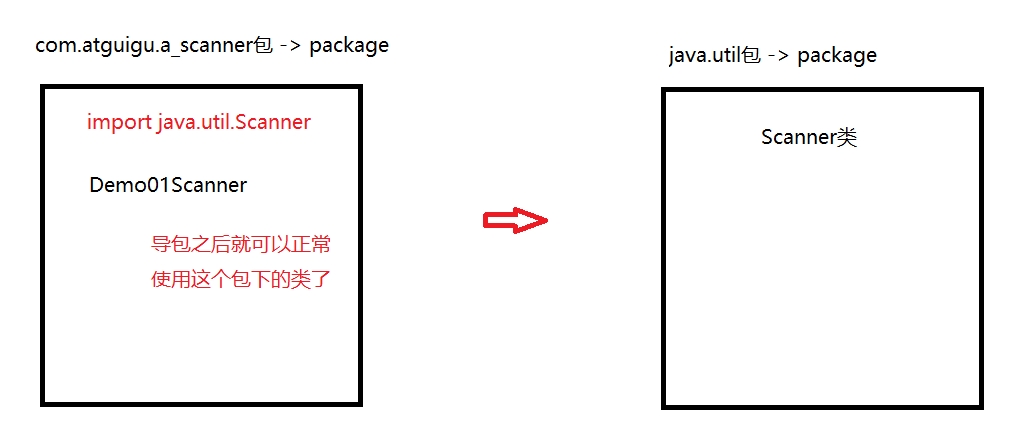
public class Demo01Scanner {
    public static void main(String[] args) {
        //创建对象
        Scanner sc = new Scanner(System.in);
        //录入一个整数
        int data1 = sc.nextInt();
        System.out.println(data1+1);

        //录入一个字符串
        String data2 = sc.next();
        System.out.println(data2+1);
    }
}
next():录入字符串,遇到空格和回车就结束录入
nextLine():录入字符串,遇到回车就结束录入
public class Demo02Scanner { public static void main(String[] args) { //创建对象 Scanner sc = new Scanner(System.in); String data = sc.next(); String data1 = sc.nextLine(); System.out.println(data); System.out.println(data1); } }
第二章.switch(选择语句)
1.switch基本使用
1.格式:
  初始化变量
  switch(变量){
      case 目标值1:
          执行语句1;
          break;
      case 目标值2:
          执行语句2;
          break;
      case 目标值3:
          执行语句3;
          break;
      ...
      default:
          执行语句n;
          break;
  }
2.执行流程:
  用变量接收的值挨个和下面的case后面的目标值做匹配,哪个case匹配上了,就走哪个case对应的执行语句,然后走break结束switch语句
  如果以上所有的case都没有匹配上,就走default对应的执行语句n

3.break的作用:
  结束switch语句

4.switch都能匹配什么类型的数据:
  byte short int char 枚举类型 String类型
public class Demo01Switch {
    public static void main(String[] args) {
        int i = 5;
        switch (i) {
            case 1:
                System.out.println("涛哥和金莲的故事");
                break;
            case 2:
                System.out.println("大郎和金莲的故事");
                break;
            case 3:
                System.out.println("西门大官人和金莲的故事");
                break;
            default:
                System.out.println("没有找到对应的故事");
                break;
        }
    }
}
public class Demo02Switch {
    public static void main(String[] args) {
        Scanner sc = new Scanner(System.in);
        int month = sc.nextInt();
        switch (month) {
            case 12:
                System.out.println("冬季");
                break;
            case 1:
                System.out.println("冬季");
                break;
            case 2:
                System.out.println("冬季");
                break;
            case 3:
                System.out.println("春季");
                break;
            case 4:
                System.out.println("春季");
                break;
            case 5:
                System.out.println("春季");
                break;
            case 6:
                System.out.println("夏季");
                break;
            case 7:
                System.out.println("夏季");
                break;
            case 8:
                System.out.println("夏季");
                break;
            case 9:
                System.out.println("秋季");
                break;
            case 10:
                System.out.println("秋季");
                break;
            case 11:
                System.out.println("秋季");
                break;
            default:
                System.out.println("输入的月份有误");
                break;
        }
    }
}
2.case的穿透性
没有break的话,就会出现case的穿透性,代码会一直往下穿透执行,直到遇到break或者switch代码结束了为止
public class Demo03Switch {
    public static void main(String[] args) {
        Scanner sc = new Scanner(System.in);
        int month = sc.nextInt();
        switch (month) {
            case 12:
            case 1:
            case 2:
                System.out.println("冬季");
                break;
            case 3:
            case 4:
            case 5:
                System.out.println("春季");
                break;
            case 6:
            case 7:
            case 8:
                System.out.println("夏季");
                break;
            case 9:
            case 10:
            case 11:
                System.out.println("秋季");
                break;
            default:
                System.out.println("输入的月份有误");
                break;
        }
    }
}
3.switch的新特性
switch新特性表达式在Java 12中作为预览语言出现,在Java 13中进行了二次预览,得到了再次改进,最终在Java 14中确定下来。另外,在Java17中预览了switch模式匹配。
传统的switch语句在使用中有以下几个问题。
(1)匹配是自上而下的,如果忘记写break,那么后面的case语句不论匹配与否都会执行。
(2)所有的case语句共用一个块范围,在不同的case语句定义的变量名不能重复。
(3)不能在一个case语句中写多个执行结果一致的条件,即每个case语句后只能写一个常量值。
(4)整个switch语句不能作为表达式返回值。
3.1.Java12的switch表达式
Java 12对switch语句进行了扩展,将其作为增强版的switch语句或称为switch表达式,可以写出更加简化的代码。
- 允许将多个case语句合并到一行,可以简洁、清晰也更加优雅地表达逻辑分支。
- 可以使用-> 代替 :
- ->写法默认省略break语句,避免了因少写break语句而出错的问题。
- ->写法在标签右侧的代码段可以是表达式、代码块或 throw语句。
- ->写法在标签右侧的代码块中定义的局部变量,其作用域就限制在代码块中,而不是蔓延到整个switch结构。
- 同一个switch结构中不能混用“→”和“:”,否则会有编译错误。使用字符“:”,这时fall-through规则依然有效,即不能省略原有的break语句。":"的写法表示继续使用传统switch语法。
案例需求:
请使用switch-case结构实现根据月份输出对应季节名称。例如,3~5月是春季,6~8月是夏季,9~11月是秋季,12~2月是冬季。
public class Demo04Switch {
    public static void main(String[] args) {
        Scanner sc = new Scanner(System.in);
        int month = sc.nextInt();
        switch (month) {
            case 12,1,2:
                System.out.println("冬季");
                break;
            case 3,4,5:
                System.out.println("春季");
                break;
            case 6,7,8:
                System.out.println("夏季");
                break;
            case 9,10,11:
                System.out.println("秋季");
                break;
            default:
                System.out.println("输入的月份有误");
                break;
        }
    }
}
以上格式,如果没有break,也会出现case的穿透性
public class Demo05Switch {
    public static void main(String[] args) {
        Scanner sc = new Scanner(System.in);
        int month = sc.nextInt();
        switch (month) {
            case 12,1,2->
                System.out.println("冬季");
            case 3,4,5->
                System.out.println("春季");
            case 6,7,8->
                System.out.println("夏季");
            case 9,10,11->
                System.out.println("秋季");
            default->
                System.out.println("输入的月份有误");
        }
    }
}
以上格式,如果不写break,也不会出现case的穿透性
3.2.Java13的switch表达式
Java 13提出了第二个switch表达式预览,引入了yield语句,用于返回值。这意味着,switch表达式(返回值)应该使用yield语句,switch语句(不返回值)应该使用break语句。
案例需求:判断季节。
public class Demo06Switch {
    public static void main(String[] args) {
        Scanner sc = new Scanner(System.in);
        int month = sc.nextInt();
        String season = "";
        switch (month) {
            case 12,1,2->
                season = "冬季";
            case 3,4,5->
                season = "春季";
            case 6,7,8->
                season = "夏季";
            case 9,10,11->
                season = "秋季";
            default->
                season = "输入的月份有误";
        }
        System.out.println(season);
    }
}
public class Demo07Switch {
    public static void main(String[] args) {
        Scanner sc = new Scanner(System.in);
        int month = sc.nextInt();
        /*
           switch中的yield将结果返回给了season这个变量
         */
        String season = switch (month) {
            case 12,1,2->{
                yield "冬季";
            }
            case 3,4,5->{
                yield "春季";
            }
            case 6,7,8->{
                yield "夏季";
            }
            case 9,10,11->{
                yield "秋季";
            }
            default->{
                yield "输入的月份有误";
            }
        };
        System.out.println(season);
    }
}
yield 结果:用于将switch中case的结果返回出去
第三章.分支语句
1.if的第一种格式
1.格式:
  if(boolean表达式){
      执行语句
  }
2.执行流程:
  先判断,如果是true,就走if后面大括号中的执行语句,否则就不走if
public class Demo01If {
    public static void main(String[] args) {
        Scanner sc = new Scanner(System.in);
        int data = sc.nextInt();
        if (data==100){
            System.out.println("输入的数据是100");
        }

        System.out.println("哈哈哈");
    }
}
2.if的第二种格式
1.格式:
  if(boolean表达式){
      执行语句1
  }else{
      执行语句2
  }
2.执行流程:
  a.先走if后面的boolean表达式,如果是true,就走if后面的执行语句1
  b.否则就走else后面的执行语句2
public class Demo02IfElse {
    public static void main(String[] args) {
        Scanner sc = new Scanner(System.in);
        int data = sc.nextInt();
        if (data==100){
            System.out.println("输入的数据是100");
        }else{
            System.out.println("输入的数据不是100");
        }
    }
}
2.1 练习
任意给出一个整数,请用程序实现判断该整数是奇数还是偶数,并在控制台输出该整数是奇数还是偶数
步骤:
  1.创建一个Scanner对象,调用nextInt方法录入一个整数data
  2.判断,如果data%2==0,如果余数是0就是偶数,否则就是奇数
public class Demo03IfElse {
    public static void main(String[] args) {
        Scanner sc = new Scanner(System.in);
        int data = sc.nextInt();
        if (data%2==0){
            System.out.println("偶数");
        }else {
            System.out.println("奇数");
        }
    }
}
2.2练习
需求.利用if else 求出两个数的较大值
public class Demo04IfElse {
    public static void main(String[] args) {
        Scanner sc = new Scanner(System.in);
        int data1 = sc.nextInt();
        int data2 = sc.nextInt();

        if (data1>data2){
            System.out.println(data1);
        }else {
            System.out.println(data2);
        }

    }
}
public class Demo05IfElse {
    public static void main(String[] args) {
        Scanner sc = new Scanner(System.in);
        int data1 = sc.nextInt();
        int data2 = sc.nextInt();
        int data3 = sc.nextInt();
        int temp = 0;
        if (data1>data2){
            temp = data1;
        }else{
            temp = data2;
        }

        if (temp>data3){
            System.out.println(temp);
        }else{
            System.out.println(data3);
        }
    }
}
2.3练习
案例:从键盘输入年份,请输出该年的2月份的总天数。闰年2月份29天,平年28天。
闰年:
 a.能被4整除,但是不能被100整除
 b.或者能直接被400整除
public class Demo06IfElse {
    public static void main(String[] args) {
        Scanner sc = new Scanner(System.in);
        int year = sc.nextInt();

        /*
           a.能被4整除,但是不能被100整除
           b.或者能直接被400整除
         */
        if (year%4==0 && year%100!=0 || year%400==0){
            System.out.println("闰年");
        }
        else{
            System.out.println("平年");
        }
    }
}
2.4练习
public class Demo07IfElse {
    public static void main(String[] args) {
        boolean num1 = false;
        boolean num2 = true;

        int i = 1;

        if (num1 = num2){
            i++;
            System.out.println(i);
        }

        if (false){
            --i;
            System.out.println(i);
        }
    }
}
3.if的第三种格式
1.格式:
  if(boolean表达式){
      执行语句1
  }else if(boolean表达式){
      执行语句2
  }else if(boolean表达式){
      执行语句3
  }...else{
      执行语句n
  }
2.执行流程:
  从上到下挨个判断,哪个条件为true就走哪个if对应的执行语句,如果以上所有的情况都判断失败了,就走else对应的执行语句n
public class Demo07ElseIf {
    public static void main(String[] args) {
        Scanner sc = new Scanner(System.in);
        int data1 = sc.nextInt();
        int data2 = sc.nextInt();
        if (data1>data2){
            System.out.println("data1>data2");
        }else if (data1<data2){
            System.out.println("data1<data2");
        }else {
            System.out.println("data1=data2");
        }
    }
}
3.1.练习
需求:
 键盘录入一个星期数(1,2,...7),输出对应的星期一,星期二,...星期日

输入  1      输出	星期一
输入  2      输出	星期二
输入  3      输出	星期三
输入  4      输出	星期四
输入  5      输出	星期五
输入  6      输出	星期六
输入  7      输出	星期日
输入  其它数字   输出      数字有误
public class Demo08ElseIf {
    public static void main(String[] args) {
        Scanner sc = new Scanner(System.in);
        int week = sc.nextInt();
        if (week==1){
            System.out.println("星期一");
        }else if (week==2){
            System.out.println("星期二");
        }else if (week==3){
            System.out.println("星期三");
        }else if (week==4){
            System.out.println("星期四");
        }else if (week==5){
            System.out.println("星期五");
        }else if (week==6){
            System.out.println("星期六");
        }else if (week==7){
            System.out.println("星期日");
        }else{
            System.out.println("输入的数字有误");
        }
    }
}
先判断一个不合理的星期
3.2练习
- 需求: 小明快要期末考试了,小明爸爸对他说,会根据他不同的考试成绩,送他不同的礼物,假如你可以控制小明的得分,请用程序实现小明到底该获得什么样的礼物,并在控制台输出。
- 奖励规则:
95~100		山地自行车一辆
90~94		游乐场玩一次
80~89		变形金刚玩具一个
80以下	   胖揍一顿
public class Demo09ElseIf {
    public static void main(String[] args) {
        Scanner sc = new Scanner(System.in);
        int score = sc.nextInt();
        if (score>=95 && score<=100){
            System.out.println("山地自行车一辆");
        }else if (score>=90 && score<=94){
            System.out.println("游乐场玩一次");
        }else if (score>=80 && score<=89){
            System.out.println("变形金刚玩具一个");
        }else if (score>=0 && score<=79){
            System.out.println("胖揍一顿");
        }else{
            System.out.println("输入的分数有误");
        }
    }
}
还可以先判断不合理的分数
第四章.循环
1.概述:反复干同一件事
1.for循环
1.格式:
  for(初始化变量;比较;布尔表达式){
      循环语句
  }
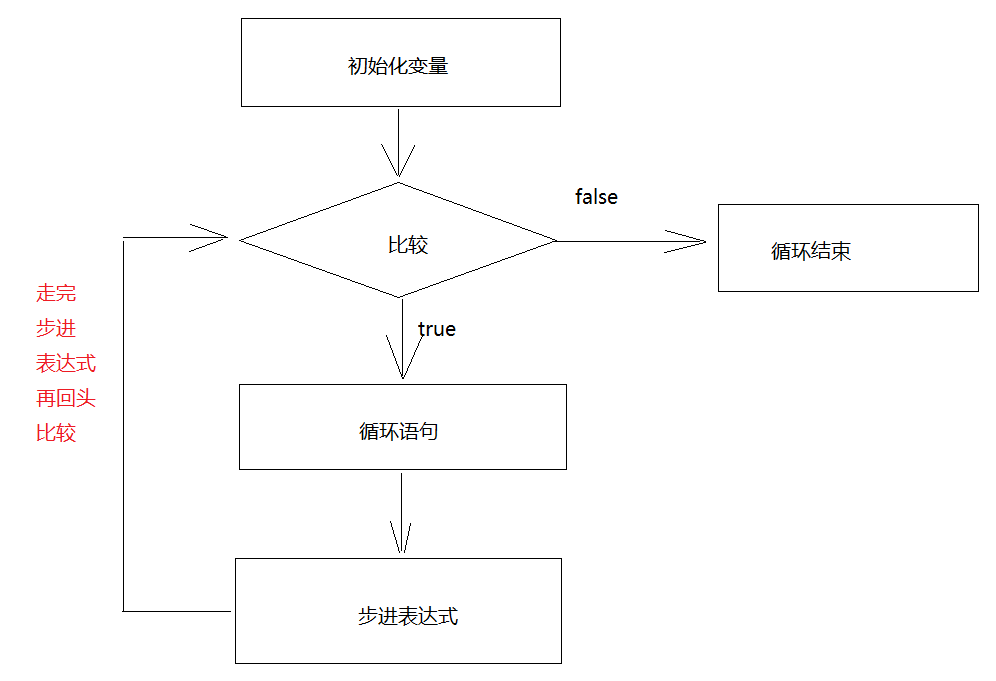
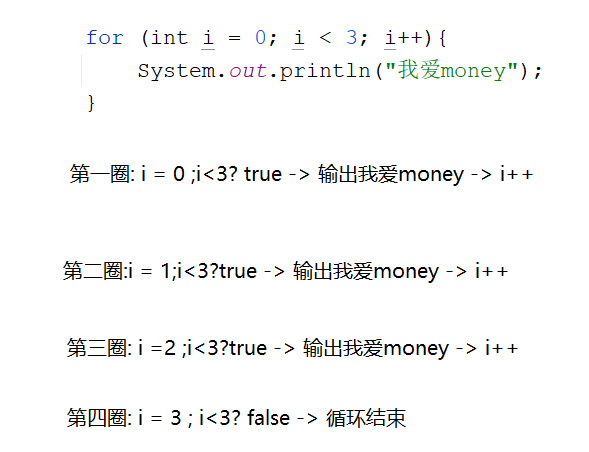
2.执行流程:
  a.先初始化变量
  b.比较,如果是true,走循环语句
  c.走步进表达式(初始化变量的值变化)
  c.再比较,如果还是true,继续走循环语句
  d.再走步进表达式
  e.再比较,直到比较为false,循环结束

3.快捷键:
  次数.fori -> 回车
public class Demo01For {
    public static void main(String[] args) {
        for (int i = 0; i < 3; i++){
            System.out.println("我爱money");
        }
    }
}
1.1.练习1
需求:求1-3的和
1+2+3

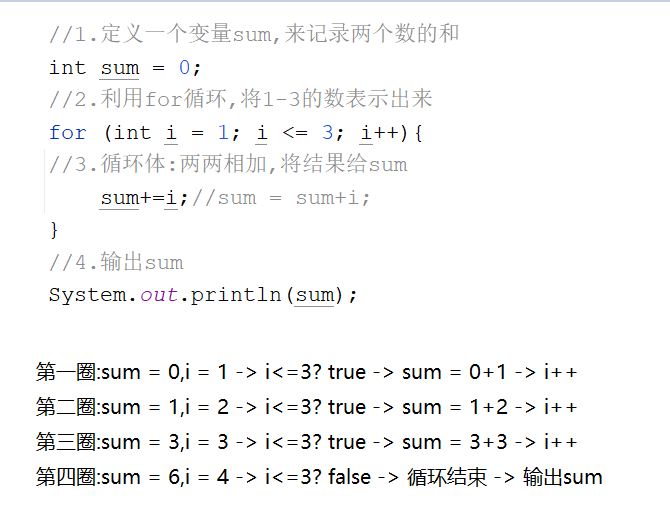
步骤:
  1.定义一个变量sum,来记录两个数的和
  2.利用for循环,将1-3的数表示出来
  3.循环体:两两相加,将结果给sum
  4.输出sum
public class Demo02For {
    public static void main(String[] args) {
        //1.定义一个变量sum,来记录两个数的和
        int sum = 0;
        //2.利用for循环,将1-3的数表示出来
        for (int i = 1; i <= 3; i++){
        //3.循环体:两两相加,将结果给sum
            sum+=i;//sum = sum+i;
        }
        //4.输出sum
        System.out.println(sum);
    }
}
1.2.练习2
需求:求1-100的偶数和
步骤:
  1.定义一个变量sum,用于接收两个数的和
  2.利用for循环将1-100的数表示出来
  3.判断,如果是偶数,两两相加,将结果赋值给sum
  4.输出sum
public class Demo03For {
    public static void main(String[] args) {
        //1.定义一个变量sum,用于接收两个数的和
        int sum = 0;
        //2.利用for循环将1-100的数表示出来
        for (int i = 1; i <= 100; i++) {
        //3.判断,如果是偶数,两两相加,将结果赋值给sum
            if (i%2==0){
                sum+=i;
            }
        }
        //4.输出sum
        System.out.println(sum);
    }
}
1.3.练习3
需求:统计1-100的偶数个数
步骤:
  1.定义一个变量count,用于记录偶数个数
  2.利用for循环将1-100的数表示出来
  3.判断,如果是偶数,count++
  4.输出count
public class Demo04For {
    public static void main(String[] args) {
        //1.定义一个变量count,用于记录偶数个数
        int count = 0;
        //2.利用for循环将1-100的数表示出来
        for (int i = 1; i <= 100; i++){
        //3.判断,如果是偶数,count++
            if (i%2==0){
                count++;
            }
        }
        //4.输出count
        System.out.println(count);
    }
}
2.while循环
1.格式:
  初始化变量;
  while(比较){
      循环语句
      步进表达式
  }
2.执行流程:
  a.先初始化变量
  b.比较,如果是true,走循环语句
  c.走步进表达式(初始化变量的值变化)
  c.再比较,如果还是true,继续走循环语句
  d.再走步进表达式
  e.再比较,直到比较为false,循环结束
public class Demo01While {
    public static void main(String[] args) {
        int i = 0;
        while (i < 3){
            System.out.println("我爱money");
            i++;
        }
    }
}
public class Demo02While {
    public static void main(String[] args) {
        int sum = 0;
        int i = 1;
        while (i <= 100){
            sum+=i;
            i++;
        }
        System.out.println(sum);
    }
}
public class Demo03While {
    public static void main(String[] args) {
        int sum = 0;
        int i = 1;
        while (i <= 100) {
            if (i % 2 == 0) {
                sum += i;
            }
            i++;
        }
        System.out.println(sum);
    }
}
public class Demo04While {
    public static void main(String[] args) {
        int count = 0;
        int i = 1;
        while (i <= 100) {
            if (i % 2 == 0) {
                count++;
            }
            i++;
        }
        System.out.println(count);
    }
}
2.1while练习
需求:世界最高山峰是珠穆朗玛峰(8844.43米=8844430毫米),假如我有一张足够大的纸,它的厚度是0.1毫米。请问,我折叠多少次,可以折成珠穆朗玛峰的高度? 27

步骤:
 1.定义三个变量,分别表示山峰高度,纸的厚度,对折次数
 2.循环判断,如果纸的厚度<山峰高度,让纸对折,次数++
 3.输出次数
public class Demo05While {
    public static void main(String[] args) {
        //1.定义三个变量,分别表示山峰高度,纸的厚度,对折次数
        int mountain = 8844430;
        double paper = 0.1;
        int count = 0;
        //2.循环判断,如果纸的厚度<山峰高度,让纸对折,次数++
        while (paper<mountain){
            paper *= 2;
            count++;
        }
        //3.输出次数
        System.out.println(count);
    }
}
3.do...while循环(了解)
1.格式:
  初始化变量
  do{
      循环语句
      步进表达式
  }while(比较);
2.执行流程:
  a.初始化变量
  b.执行循环语句
  c.走步进表达式
  d.比较,如果是true,就走循环语句,走步进表达式
  e.再比较,直到比较为false,循环结束
3.特点:
  至少循环一次
public class Demo06_DoWhile {
    public static void main(String[] args) {
        int i = 0;
        do {
            System.out.println("hello world");
            i++;
        } while (i < 3);
    }
}
4.循环的区别
 1.for:for循环中初始化的变量,出了for循环无法使用
 2.while:while循环中初始化的变量,出了while循环还能使用
 3.do...while循环:至少执行一次
5.循环控制关键字
1.break:
  a.在switch中,代表的是结束switch
  b.在循环中,代表结束循环
2.continue:
  在循环中,代表的是结束本次循环,进入到下一次循环
public class Demo01BreakAndContinue {
    public static void main(String[] args) {
        for (int i = 1; i <= 5; i++) {
            if (i == 3) {
                //break;//结束循环
                continue;//结束当前循环,继续下一次循环
            }
            System.out.println("我爱money"+i);
        }
    }
}
6.死循环
1.概述:一直循环,结束不了
2.产生条件:循环过程中,比较条件永远成立
public class Demo02DieFor {
    public static void main(String[] args) {
        int count = 0;
        /*for (int i = 0;i<=10;){
            count++;
            System.out.println("hello world"+count);
        }*/
        while(true){
            count++;
            System.out.println("hello world"+count);
        }
    }
}
7.嵌套循环
1.概述:循环体里面还有循环
2.执行流程:
  先走外层循环,再走内层循环,内层循环就一直循环,直到内层循环结束,外层循环进入到下一次循环,直到外层循环都结束了,整体结束
public class Demo03ForInFor {
    public static void main(String[] args) {
        for (int fen = 0; fen < 60; fen++) {
            for (int miao = 0; miao < 60; miao++) {
                System.out.println(fen+"分"+miao+"秒");
            }
        }
    }
}
第五章.Random随机数
和Scanner学习方式一样
1.概述:是java自带的类
2.作用:在指定的范围内随机一个数
3.使用:
  a.导包:import java.util.Random
  b.创建对象:Random 变量名 = new Random()
  c.调用方法,生成随机数
    变量名.nextInt() -> 在int的取值范围内随机一个整数
    变量名.nextInt(int bound) -> 在0-(bound-1)之间随机一个整数

4.需求:
  a.在1-10之间随机: nextInt(10)+1  -> (0-9)+1 -> 1-10
  b.在1-100之间随机:nextInt(100)+1 -> (0-99)+1 -> 1-100
  c.在100-999之间随机:nextInt(900)+100 -> (0-899)+100 -> 100-999
public class Demo01Random {
    public static void main(String[] args) {
        Random rd = new Random();
        int data1 = rd.nextInt();
        System.out.println("data1 = " + data1);
        System.out.println("=====================");
        int data2 = rd.nextInt(10);
        System.out.println("data2 = " + data2);
        System.out.println("=====================");
        int data3 = rd.nextInt(10)+1;
        System.out.println("data3 = " + data3);
    }
}
需求:完成一个猜数字小游戏
public class Demo02Random {
    public static void main(String[] args) {
        //1.创建Scanner和Random对象
        Scanner sc = new Scanner(System.in);
        Random rd = new Random();
        //2.调用rd中的nextInt方法,在1-100之间随机一个数
        int rdNumber = rd.nextInt(100) + 1;
        while(true){
            //3.录入一个整数,代表猜的
            int scNumber = sc.nextInt();
            //4.比较
            if (scNumber>rdNumber){
                System.out.println("猜大了");
            }else if (scNumber<rdNumber){
                System.out.println("猜小了");
            }else {
                System.out.println("猜对了");
                break;
            }
        }
    }
}




评论